

$addons: GOBL applies the Flux 10 rules when the document is built, and the record step rejects documents that don’t carry the add-on.
Sub-flows
Each recorded document is classified into one of four sub-flows based on supplier and customer SIREN:Recording workflow
Every invoice and payment that requires reporting goes through a single Record workflow. The action looks at the supplier and customer SIRENs and files the document into the right sub-flow (10.1 to 10.4) ready for the next report.PPF record document for reporting
Add to my workspace →
- Workflow
- Code
Payments
For10.2 international B2B payments set lines[i].document on the payment to the invoice it settles. The minimum reference is the invoice number and issue date:
10.2 (international B2B payment) rather than 10.4 (domestic B2C payment), and allows GOBL to allocate the cashed amount across the invoice’s VAT rates for you.
For B2C payments (10.4), specify the tax breakdown directly on the payment line:
Exemption reasons
Lines usingexempt, reverse-charge, intra-community, export, or outside-scope rates must include a free-text reason. Add it to the invoice’s tax block:
key must match the rate used on the line. Lines on standard or zero rates do not need a note.
Correcting a recorded document
To fix a document after it was recorded, run thegov-fr.reporting.unrecord action against its silo entry. It removes the document from the pending records so you can correct it and run the record workflow again.
- You can unrecord at any time until the window’s filing deadline, whatever state its report is in. The next generation rebuilds the report without the document: as a replacement while the report never reached the PPF, or as a corrective filing when it was already submitted.
- After the filing deadline a submitted or filed report stands, and its documents can no longer be unrecorded.
- Unrecording a document that was never recorded is a no-op, so the action is safe to include in shared correction workflows.
Submitting reports
A separate workflow bundles the records for a closed reporting window into a single Flux 10 report and sends it to the PPF. Invopop runs it automatically on the cadence set by the VAT regime — you do not need to trigger it.PPF generate and send reporting document
Add to my workspace →
- Workflow
- Code
Tell Invopop which workflow to run on the schedule: in the Apps view, open the France app, click Configure to open the configuration sidebar, and select this workflow under Reporting Workflow.
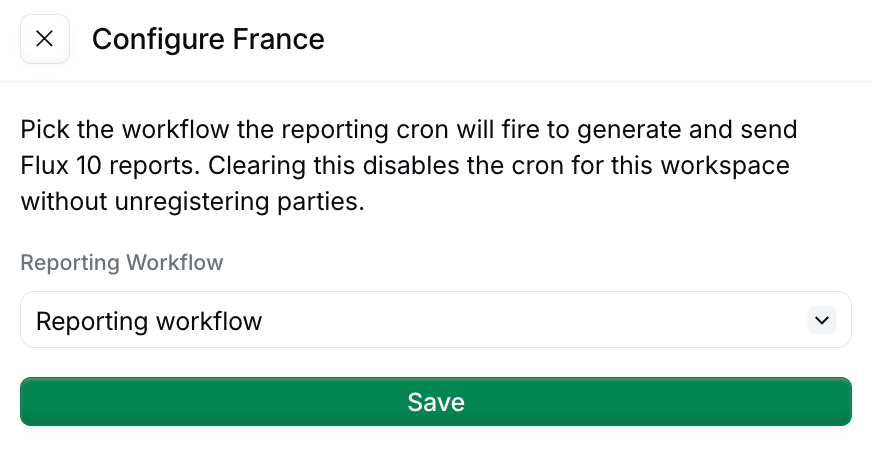
Selecting the reporting workflow in the France app configuration sidebar
Picking a VAT regime at supplier registration
If you have a single supplier, or all your suppliers have the same cadence, you can configure the Register party for reporting step in the PPF register supplier workflow to a specific cadence. For multiple suppliers (whitelabel use cases) where different suppliers have different cadence, pass it as a job argument with keyvat-regime when creating the job. When not stated, the default is real_normal_monthly.
The cadence must match the regime registered with the tax office. If in doubt, check with your local accountant.
Reading submitted transactions
The France dashboard’s Transactions Flow 8 / 9 tab lists every document submitted for e-reporting. In the Console, open the Apps view, select the France app, and switch to the Transactions Flow 8 / 9 tab. The tab shows one sub-flow at a time: the Flow type filter is always active, defaults to International B2B invoices (10.1), and switches between the four sub-flows. It can be changed but not cleared.
Each row shows the Document code and Document date, when it was Recorded, whether a report already covers it (Generated report), the Supplier SIREN, the *low type, the Role (Seller or Buyer; domestic B2C rows carry no role), the Silo entry, and the amounts the report will carry: Currency, Taxable total, Tax total (EUR), Amount (EUR), and FX rate, plus the counterparty identification and, on B2C rows, the category code.
Clicking on the Generated report column opens the Reporting Flow 10 tab filtered to that report. A dash means the row is still waiting for its reporting window to close.
Reading generated reports
The Reporting Flow 10 tab lists the generated Flow 10 XML reports. Each row shows the Reporting period the report covers, the SIREN, the Kind (Transactions for invoice data, Payments for payment data), the Role of the stream (Seller, Buyer), the submission Status, the report Sequence number, the PPF Ack ref, the Submitted at timestamp, and the Period ID.
Click options on this tab:
Clicking Download fetches the exact XML submitted to the PPF, the same payload the
/xml endpoint returns.Reading what’s filed
Four read endpoints expose submission status and the raw report XML, all scoped to the party’s silo entry id: GET/v1/reports/:silo_entry_id Summary per kind (current window, next deadline, last filed report) GET
/v1/reports/:silo_entry_id/periods Paginated history of filed periods (filter with
?kind=tx or ?kind=py)
GET /v1/reports/:silo_entry_id/periods/:period_id A single period’s metadata GET
/v1/reports/:silo_entry_id/periods/:period_id/xml The raw report XML sent to the PPF
FAQ
How do I schedule periodic reports for France?
How do I schedule periodic reports for France?
For TVA, file via DGFiP’s portal — Invopop does not generate CA3 yet. For e-reporting (Flow 10): submit via your Plateforme Agréée — Invopop’s e-reporting workflow batches transactions per period and submits to the PPF.
What format does France expect for periodic reports?
What format does France expect for periodic reports?
TVA: DGFiP’s EDI-TVA XML schema. E-reporting Flow 10: a structured JSON/XML payload defined by the PPF specification (currently in beta). Invopop emits Flow 10 via the upcoming
fr-ctc-flow10-v1 GOBL addon.How often must I submit France PA reports?
How often must I submit France PA reports?
Flow 10 e-reporting: 3× per month (every 10 days) for B2C and cross-border transactions. Lifecycle status (CDAR): per event, near real-time. Specific deadlines depend on the supplier’s tax filing cadence (monthly/quarterly).
What format does France PA expect for periodic reports?
What format does France PA expect for periodic reports?
Flow 10 uses a JSON envelope wrapping aggregated transaction data, defined in the PPF technical specification. Lifecycle CDAR payloads are XML messages exchanged over Peppol with structured status codes.
How many pops does e-reporting in France cost?
How many pops does e-reporting in France cost?
Recording a transaction for e-reporting (B2C or international B2B) costs 2 pops per invoice: 1 pop to record it and 1 pop for the silo entry. On top of that, each report submission costs 10 pops. See Pops & pricing for how pops work.
A buyer has refused an invoice (210 Refusée). What happens next?
A buyer has refused an invoice (210 Refusée). What happens next?
A refusal cancels the invoice. It can’t be corrected, re-sent, or
revived — the transaction has to be re-invoiced from scratch, and the
refusal is reported to the DGFiP.
Refusal is not a dispute. It is reserved for a short list of
grounds: a legal or contractual omission the platforms don’t check
(a missing PO reference, for instance), a transaction the buyer
doesn’t recognise, or an objective contractual block. Disagreement
over price, quantity, or delivery is a dispute — the invoice stays
in force and payable while the parties sort it out. Expect buyers to
reach for “refuse” when they mean “contest”, and give them a
separate path if you’re building the UI.Payment terms restart. The replacement invoice carries its own
due date, so agree explicitly with the counterparty how late-payment
penalties are treated across the gap rather than assuming the
original clock survives.Most refusals are preventable. The common grounds trace back to
the mandatory mentions: buyer SIREN, delivery address where it
differs from billing, nature of the operation, and any PO reference
the buyer requires. Getting those right on issue removes most of the
exposure.
🇫🇷 Invopop resources for France
🇫🇷 Invopop resources for France
| Compliance | Invoicing compliance in France Compliance timeline |
| Apps | France Peppol Chorus Pro France |
| Guides | Chorus Pro — Supplier registration · Issuing invoices PA Guide — Registration · Invoicing · Status · Reporting |
| FAQ | France FAQ |
| GOBL | France Tax Regime Chorus Pro Addon French Factur-X Addon |
| GitHub | gobl.xinvoice |


