> ## Documentation Index
> Fetch the complete documentation index at: https://invopop-auto-sync-workflow-templates.mintlify.site/llms.txt
> Use this file to discover all available pages before exploring further.
# Reporting on France PA
> Periodic e-reporting (Flux 10) of B2C and non-regulated B2B transactions to the PPF.
E-reporting covers everything that is out of scope for regulated e-invoicing (B2C sales, cross-border B2B, and any flow where one party is not registered in the Annuaire). Instead of routing each invoice individually, you **record** each invoice and payment, Invopop generates a Flux 10 XML for each reporting window, and sends it to the PPF.
Reports use the [fr-ctc-flow10-v1](https://docs.gobl.org/addons/fr-ctc-flow10-v1) add-on.
## Sub-flows
Each recorded document is classified into one of four sub-flows based on supplier and customer SIREN:
| Flow | Scope |
| ------ | -------------------------- |
| `10.1` | International B2B invoices |
| `10.2` | International B2B payments |
| `10.3` | Domestic B2C invoices |
| `10.4` | Domestic B2C payments |
## Recording workflow
Every invoice and payment that requires reporting goes through a single **Record** workflow. The action looks at the supplier and customer SIRENs and files the document into the right sub-flow (10.1 to 10.4) ready for the next report.
Add to my workspace →
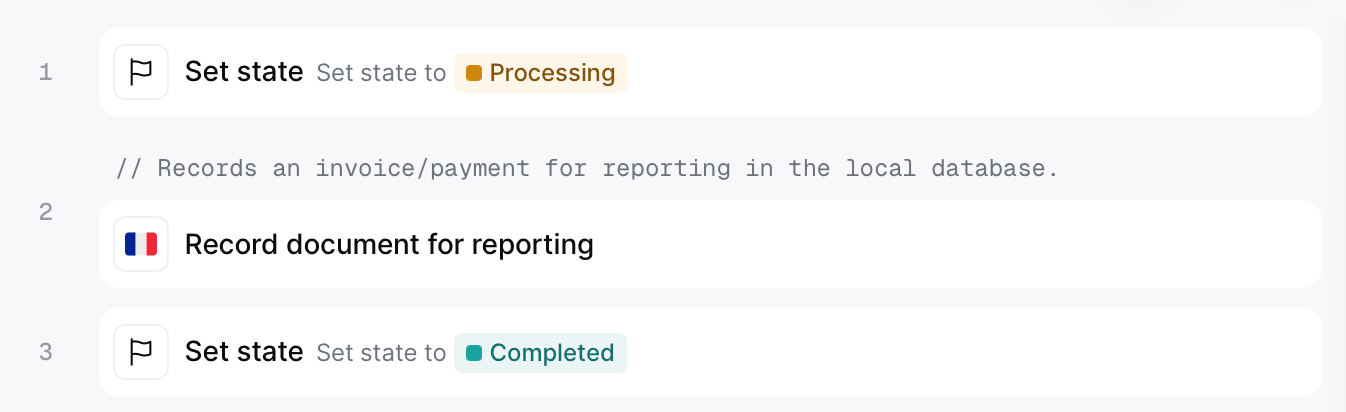 ```json Reporting record document workflow theme={"system"}
{
"name": "PPF record document for reporting",
"description": "Record a document as a Flux 10 row for French e-reporting",
"steps": [
{
"id": "753fdc8d-80ce-4a3f-a8ca-c01158e64cf9",
"name": "Set state",
"provider": "silo.state",
"summary": "Set state to `processing`{.state .processing}",
"config": {
"state": "processing"
}
},
{
"id": "7d204bc6-f42d-4f55-b08a-fca3c19bee15",
"name": "Record document for reporting",
"provider": "gov-fr.reporting.record",
"notes": "Records an invoice/payment for reporting in the local database."
},
{
"id": "d0660d9a-31b0-4428-b9da-bef14f7ae200",
"name": "Set state",
"provider": "silo.state",
"summary": "Set state to `completed`{.state .completed}",
"config": {
"state": "completed"
}
}
],
"rescue": [
{
"id": "7ec292ea-36f2-49bb-b2ce-bb97bd6a1782",
"name": "Set state",
"provider": "silo.state",
"summary": "Set state to `error`{.state .error}",
"config": {
"state": "error"
}
}
]
}
```
### Payments
For `10.2` international B2B payments set `lines[i].document` on the payment to the invoice it settles. The minimum reference is the invoice number and issue date:
```json theme={"system"}
{ "code": "INVOICE-NUMBER", "issue_date": "2026-05-15" }
```
This is what tells the record action to file the payment as `10.2` (international B2B payment) rather than `10.4` (domestic B2C payment), and allows GOBL to allocate the cashed amount across the invoice's VAT rates for you.
For B2C payments (`10.4`), specify the tax breakdown directly on the payment line:
```json theme={"system"}
"lines": [
{
"amount": "120.00",
"tax": {
"categories": [
{
"code": "VAT",
"rates": [{ "base": "100.00", "percent": "20%", "amount": "20.00"}]
}
]
}
}
]
```
### Exemption reasons
Lines using `exempt`, `reverse-charge`, `intra-community`, `export`, or `outside-scope` rates must include a free-text reason. Add it to the invoice's tax block:
```json theme={"system"}
{
"tax": {
"notes": [
{
"cat": "VAT",
"key": "intra-community",
"text": "Exonération article 262 ter I du CGI — livraison intracommunautaire"
}
]
}
}
```
The `key` must match the rate used on the line. Lines on `standard` or `zero` rates do not need a note.
## Submitting reports
A separate workflow bundles the records for a closed reporting window into a single Flux 10 report and sends it to the PPF. Invopop runs it automatically on the cadence set by the VAT regime — you do not need to trigger it.
Add to my workspace →
```json Reporting record document workflow theme={"system"}
{
"name": "PPF record document for reporting",
"description": "Record a document as a Flux 10 row for French e-reporting",
"steps": [
{
"id": "753fdc8d-80ce-4a3f-a8ca-c01158e64cf9",
"name": "Set state",
"provider": "silo.state",
"summary": "Set state to `processing`{.state .processing}",
"config": {
"state": "processing"
}
},
{
"id": "7d204bc6-f42d-4f55-b08a-fca3c19bee15",
"name": "Record document for reporting",
"provider": "gov-fr.reporting.record",
"notes": "Records an invoice/payment for reporting in the local database."
},
{
"id": "d0660d9a-31b0-4428-b9da-bef14f7ae200",
"name": "Set state",
"provider": "silo.state",
"summary": "Set state to `completed`{.state .completed}",
"config": {
"state": "completed"
}
}
],
"rescue": [
{
"id": "7ec292ea-36f2-49bb-b2ce-bb97bd6a1782",
"name": "Set state",
"provider": "silo.state",
"summary": "Set state to `error`{.state .error}",
"config": {
"state": "error"
}
}
]
}
```
### Payments
For `10.2` international B2B payments set `lines[i].document` on the payment to the invoice it settles. The minimum reference is the invoice number and issue date:
```json theme={"system"}
{ "code": "INVOICE-NUMBER", "issue_date": "2026-05-15" }
```
This is what tells the record action to file the payment as `10.2` (international B2B payment) rather than `10.4` (domestic B2C payment), and allows GOBL to allocate the cashed amount across the invoice's VAT rates for you.
For B2C payments (`10.4`), specify the tax breakdown directly on the payment line:
```json theme={"system"}
"lines": [
{
"amount": "120.00",
"tax": {
"categories": [
{
"code": "VAT",
"rates": [{ "base": "100.00", "percent": "20%", "amount": "20.00"}]
}
]
}
}
]
```
### Exemption reasons
Lines using `exempt`, `reverse-charge`, `intra-community`, `export`, or `outside-scope` rates must include a free-text reason. Add it to the invoice's tax block:
```json theme={"system"}
{
"tax": {
"notes": [
{
"cat": "VAT",
"key": "intra-community",
"text": "Exonération article 262 ter I du CGI — livraison intracommunautaire"
}
]
}
}
```
The `key` must match the rate used on the line. Lines on `standard` or `zero` rates do not need a note.
## Submitting reports
A separate workflow bundles the records for a closed reporting window into a single Flux 10 report and sends it to the PPF. Invopop runs it automatically on the cadence set by the VAT regime — you do not need to trigger it.
Add to my workspace →
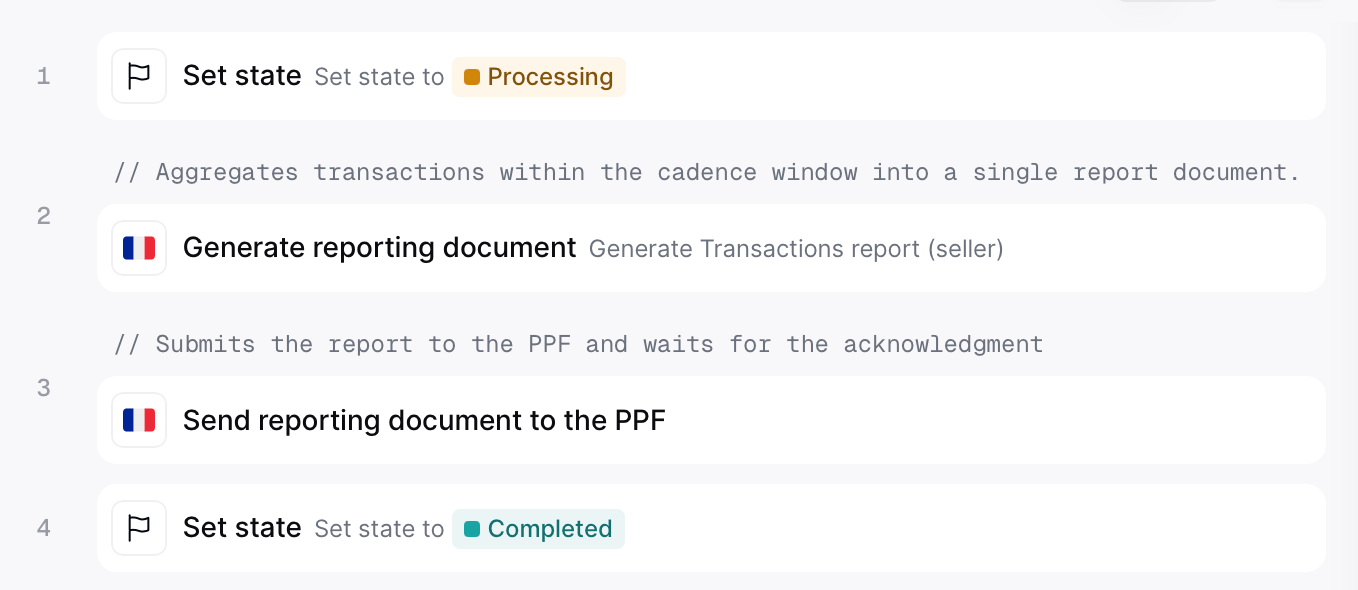 ```json Reporting send document workflow theme={"system"}
{
"name": "PPF send reporting document",
"description": "Generate and send a French e-reporting transaction",
"schema": "org/party",
"steps": [
{
"id": "98f7aba6-8008-455d-a620-90f2bf80bf49",
"name": "Set state",
"provider": "silo.state",
"summary": "Set state to `processing`{.state .processing}",
"config": {
"state": "processing"
}
},
{
"id": "888e98ad-785b-4dc4-b610-8cf39cce9157",
"name": "Generate reporting document",
"provider": "gov-fr.reporting.generate",
"summary": "Generate Transactions report (seller)",
"config": {
"flux_kind": "tx",
"role": "seller"
}
},
{
"id": "066eac4a-a9c2-486c-aa30-a3d6f49d7582",
"name": "Send document for reporting",
"provider": "gov-fr.reporting.send"
},
{
"id": "e5990ba3-6696-4ebe-b29a-14acd307c864",
"name": "Set state",
"provider": "silo.state",
"summary": "Set state to `completed`{.state .completed}",
"config": {
"state": "completed"
}
}
],
"rescue": [
{
"id": "437ed708-bf87-491e-8447-5096ad4017c2",
"name": "Set state",
"provider": "silo.state",
"summary": "Set state to `error`{.state .error}",
"config": {
"state": "error"
}
}
]
}
```
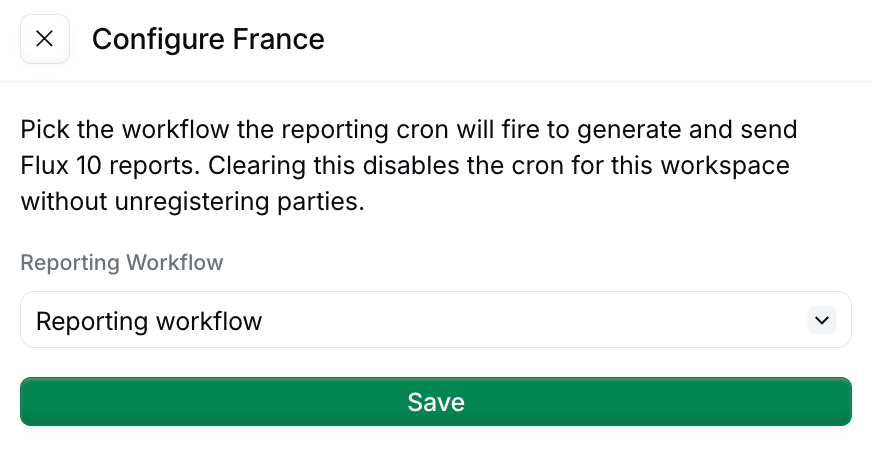
Tell Invopop which workflow to run on the schedule: in the **Apps** view, open the **France** app, click **Configure** to open the configuration sidebar, and select this workflow under **Reporting Workflow**.
```json Reporting send document workflow theme={"system"}
{
"name": "PPF send reporting document",
"description": "Generate and send a French e-reporting transaction",
"schema": "org/party",
"steps": [
{
"id": "98f7aba6-8008-455d-a620-90f2bf80bf49",
"name": "Set state",
"provider": "silo.state",
"summary": "Set state to `processing`{.state .processing}",
"config": {
"state": "processing"
}
},
{
"id": "888e98ad-785b-4dc4-b610-8cf39cce9157",
"name": "Generate reporting document",
"provider": "gov-fr.reporting.generate",
"summary": "Generate Transactions report (seller)",
"config": {
"flux_kind": "tx",
"role": "seller"
}
},
{
"id": "066eac4a-a9c2-486c-aa30-a3d6f49d7582",
"name": "Send document for reporting",
"provider": "gov-fr.reporting.send"
},
{
"id": "e5990ba3-6696-4ebe-b29a-14acd307c864",
"name": "Set state",
"provider": "silo.state",
"summary": "Set state to `completed`{.state .completed}",
"config": {
"state": "completed"
}
}
],
"rescue": [
{
"id": "437ed708-bf87-491e-8447-5096ad4017c2",
"name": "Set state",
"provider": "silo.state",
"summary": "Set state to `error`{.state .error}",
"config": {
"state": "error"
}
}
]
}
```
Tell Invopop which workflow to run on the schedule: in the **Apps** view, open the **France** app, click **Configure** to open the configuration sidebar, and select this workflow under **Reporting Workflow**.
 You can also trigger this workflow manually against any registered party — useful for testing, or to bring a party up to date after onboarding.
### Picking a VAT regime at supplier registration
If you have a single supplier, or all your suppliers have the same cadence, you can configure the **Register party for reporting** step in the [PPF register supplier workflow](/guides/fr-pa-registration#ppf-register-supplier-workflow) to a specific cadence.
For multiple suppliers (whitelabel use cases) where different suppliers have different cadence, pass it as a job argument with key `vat-regime` when creating the job. When not stated, the default is `real_normal_monthly`.
| VAT regime | `args.vat-regime` |
| ------------------------ | ----------------------- |
| Monthly Actual (default) | `real_normal_monthly` |
| Quarterly Actual | `real_normal_quarterly` |
| Simplified VAT | `simplified` |
| Non-Established Taxpayer | `franchise` |
The cadence must match the regime registered with the tax office. If in doubt, check with your local accountant.
## Reading what's filed
Four read endpoints expose submission status and the raw report XML, all scoped to the party's silo entry id:
GET `/v1/reports/:silo_entry_id`
You can also trigger this workflow manually against any registered party — useful for testing, or to bring a party up to date after onboarding.
### Picking a VAT regime at supplier registration
If you have a single supplier, or all your suppliers have the same cadence, you can configure the **Register party for reporting** step in the [PPF register supplier workflow](/guides/fr-pa-registration#ppf-register-supplier-workflow) to a specific cadence.
For multiple suppliers (whitelabel use cases) where different suppliers have different cadence, pass it as a job argument with key `vat-regime` when creating the job. When not stated, the default is `real_normal_monthly`.
| VAT regime | `args.vat-regime` |
| ------------------------ | ----------------------- |
| Monthly Actual (default) | `real_normal_monthly` |
| Quarterly Actual | `real_normal_quarterly` |
| Simplified VAT | `simplified` |
| Non-Established Taxpayer | `franchise` |
The cadence must match the regime registered with the tax office. If in doubt, check with your local accountant.
## Reading what's filed
Four read endpoints expose submission status and the raw report XML, all scoped to the party's silo entry id:
GET `/v1/reports/:silo_entry_id`
Summary per kind (current window, next deadline, last filed report)
GET `/v1/reports/:silo_entry_id/periods`
Paginated history of filed periods (filter with `?kind=tx` or `?kind=py`)
GET `/v1/reports/:silo_entry_id/periods/:period_id`
A single period's metadata
GET `/v1/reports/:silo_entry_id/periods/:period_id/xml`
The raw report XML sent to the PPF
## FAQ
For TVA, file via DGFiP's portal — Invopop does not generate CA3 yet. For e-reporting (Flow 10): submit via your Plateforme Agréée — Invopop's e-reporting workflow batches transactions per period and submits to the PPF.
TVA: DGFiP's EDI-TVA XML schema. E-reporting Flow 10: a structured JSON/XML payload defined by the PPF specification (currently in beta). Invopop emits Flow 10 via the upcoming `fr-ctc-flow10-v1` GOBL addon.
Flow 10 e-reporting: 3× per month (every 10 days) for B2C and cross-border transactions. Lifecycle status (CDAR): per event, near real-time. Specific deadlines depend on the supplier's tax filing cadence (monthly/quarterly).
Flow 10 uses a JSON envelope wrapping aggregated transaction data, defined in the PPF technical specification. Lifecycle CDAR payloads are XML messages exchanged over Peppol with structured status codes.
More available in our [France FAQ](/faq/france) section
***
| | |
| ---------- | ------------------------------------------------------------------------------------------------------------------------------------------------------------------------------------------------------------------------------------------------------------------------------------------------------------------------------------------------------------------------------------- |
| Compliance | [Invoicing compliance in France](/compliance/france)
[Compliance timeline](/timelines/france) |
| Apps | [France](/apps/france)
[Peppol](/apps/peppol)
[Chorus Pro France](/apps/choruspro-france) |
| Guides | Chorus Pro — [Supplier registration](/guides/fr-chorus-pro-supplier) · [Issuing invoices](/guides/fr-chorus-pro)
[PA Guide](/guides/fr-pa) — [Registration](/guides/fr-pa-registration) · [Invoicing](/guides/fr-pa-invoicing) · [Status](/guides/fr-pa-status) · [Reporting](/guides/fr-pa-reporting) |
| FAQ | [France FAQ](/faq/france) |
| GOBL | [France Tax Regime](https://docs.gobl.org/regimes/fr)
[Chorus Pro Addon](https://docs.gobl.org/addons/fr-choruspro-v1)
[French Factur-X Addon](https://docs.gobl.org/addons/fr-facturx-v1) |
| GitHub | [gobl.xinvoice](https://github.com/invopop/gobl.xinvoice) |